 Richard's Blog
Cutting the thermal stream and SLAM load on IGNIS-8
Key points. Everything in this post was measured on the development bench — the numbers are real. The palette went from roughly 900 % of one core to about 46 %, the thermal stream from 50 to 25 delivered frames per second, and the SLAM map from about 256,000 canvas operations per second to a handful. The OVERLOAD badge it is about reports on the operator's browser, not on the vehicle. IGNIS-8 stays a hobby project in the planning phase — no working prototype yet.
Why the badge said OVERLOAD#
IGNIS-8 is a remotely operated UGV — four axles, eight driven and steered wheels, a thermal camera as the primary instrument, and a handheld browser as the operator terminal. The vehicle controller runs a watchdog: if no command arrives for 150 ms, the drives stop. The terminal feeds that watchdog, and the terminal is a browser — its main thread is where drawing, layout and garbage collection all happen.
The connection badge has a state for when that main thread has dropped behind: a yellow OVERLOAD. It means the operator's terminal stopped delivering control commands in time. The watchdog was doing its job; the problem was what fed it. When I watched the command channel's own statistics, the numbers showed the main thread periodically stalling — and one of the biggest culprits turned out to be the map view, the operator's default view.
The thermal stream: the palette ate the budget#
The vehicle computer also had a problem. I configured the thermal camera honestly, and the arithmetic was unforgiving.
The thermal camera is a UVC imaging module that delivers 640×512 raw frames — I switched to it from the 256×192 sensor the vehicle originally carried, because resolving a hot cell at a distance needs the resolution. The false-colour palette was built with FFmpeg's geq filter, which evaluates a piecewise colour expression per pixel, per channel. On the small sensor that was affordable. At 640×512 the cost scales with the pixel count: the palette alone peaked at roughly 900 % of one core on the vehicle computer. The computer (an x86 mini-PC with a Core i9-10980HK, which replaced an earlier ARM board) still has to run the control loop, the LiDAR processing and the video encoding — 900 % is 900 % no matter which machine pays it.
The fix was to replace geq with FFmpeg's lut filter. Because the palette expression depends only on the pixel value, lut evaluates it once into a 256-entry table and then applies the table per pixel. I compared the outputs byte for byte — identical colours. The palette dropped to about 46 % of one core.
Two more things came out of the same measurement. The UVC driver forces 50 fps no matter what is requested, so the pipeline now caps the delivered stream at 25 fps at the head of the chain — halving the encode, palette and radio cost on top of the lut gain. And a sharpening filter in the chain, which had cost about 40 % of a core for a cosmetic effect on a small handheld screen, was removed.
The map: a quarter of a million canvas calls per second#
The default view is the SLAM height map — a heading-up raster of the surroundings, streamed at 20 Hz. It was drawn the straightforward way: for every measured cell, a filled rectangle plus an outline. At up to 80×80 cells that is on the order of 6,400 drawing operations per frame, twenty times per second — roughly a quarter of a million canvas operations per second on the handheld's main thread, the very thread that has to keep feeding the watchdog.
The map is now rendered once per message into a 1 px-per-cell offscreen canvas (plain typed-array writes, no allocations), and each frame blits the visible region with a single drawImage. The cell-boundary grid lines are one batched path with one stroke. The per-frame cost went from thousands of canvas calls to a handful.
The result#
The thermal stream went from roughly 930 % of one core (sharpening + geq at 50 fps) to about 40 % at 25 fps with the palette, and the map view stopped stalling the operator terminal. No more OVERLOAD on the badge — and, more importantly, a control chain that no longer depends on how many triangles the browser happens to be drawing.
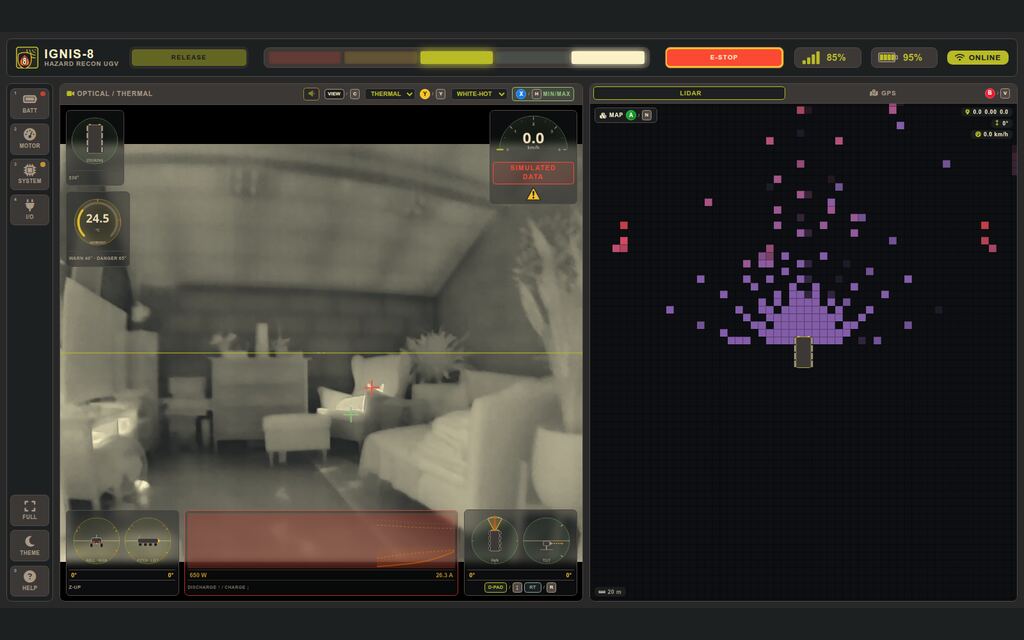
The screenshot shows the thermal view with the hottest/coldest pixel marks enabled — the two crosshairs over the image. The raw gray is tapped before the palette, so the marks stay correct under every false-colour mapping. And since no build is complete without a first test subject: that was our dog Emil, who volunteered the warmest pixel in every thermal frame and was extremely proud of it.